Fansly CRM for agencies and chatter teams
CreatorXOne is a Fansly CRM for agencies that run chatter teams. Your chatters work Fansly inside the CreatorXOne desktop app. Your managers see sessions, fans, staff chat and logs in one dashboard. OnlyFans and Fansly are fully supported in the same workspace, and ManyVids and LoyalFans are supported too. Pricing is €1 per creator per active day (€0.33 ManyVids), and employees are unlimited.
14-day trial, no credit card. Built by Digital Aura, s.r.o.
Running Fansly with a team gets messy fast
- Logins get passed around in Telegram, and nobody knows who is signed in to which creator.
- Two chatters answer the same fan, or a fan waits because everyone thought someone else had it.
- Chatters can open Fansly earnings and payout pages they don't need.
- Staff questions happen in a separate app, so the answer arrives after the fan has gone.
- When something goes wrong, there is no single record of who opened, sent or downloaded what.
CreatorXOne puts the Fansly session, the team rules and the record of what happened in one place.
Fansly sessions in the desktop app
- In-app browser or Chrome. Fansly can open in the CreatorXOne in-app browser or in Google Chrome. The setting is called Open in the in-app browser (Beta).
- Session-only creator connect. Store encrypted login details, or skip storing the password and sign in on desktop. Then CreatorXOne saves the session, not the password, and 2FA stays on Fansly.
- Several chatters on one creator. Each person works in their own session slot.
- Live Sessions and Reconnect. If Fansly signs a session out, the slot shows Needs re-login and managers get a Live Sessions notice. Reconnect reopens sign-in on the same slot.
- Your own proxy or ours, set per creator session.
- Live ops. The Sessions tab shows who holds each creator account. The Board tab shows who is chatting, waiting or idle.
Desktop app for Windows, macOS and Linux. Download the desktop app
Inbox split and chatter presence on Fansly

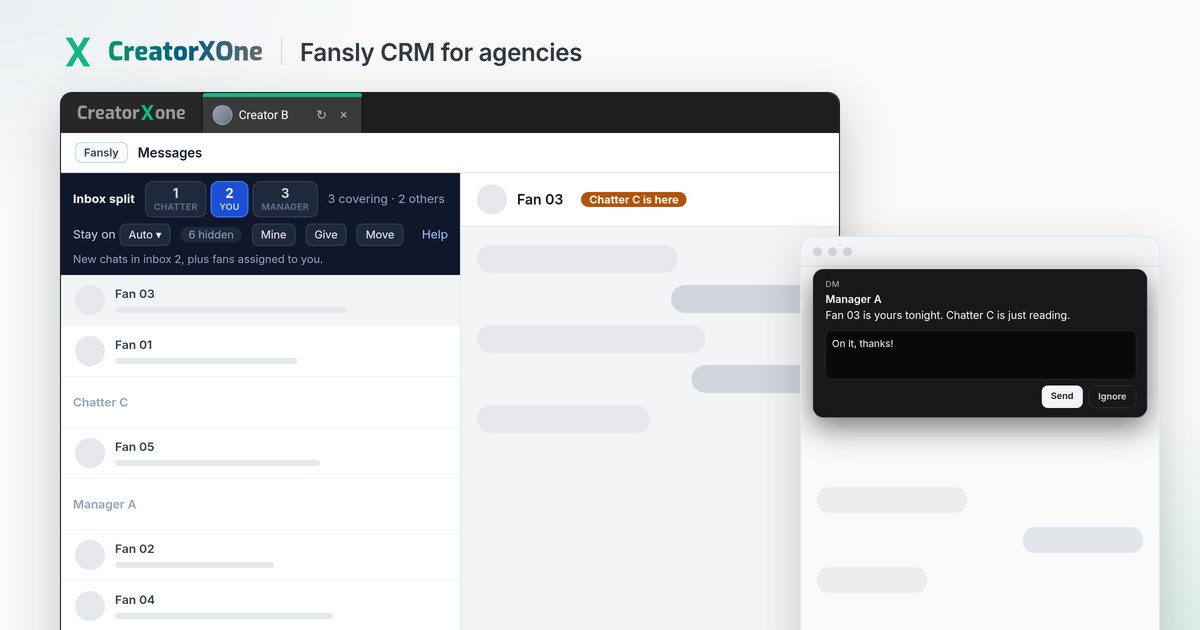
A manager splits one Fansly creator's inbox into 2 to 9 queues, so two people don't answer the same fan. An "… is here" badge sits on the open chat's header. Fans with an assigned owner stay with that owner, even when that owner is away. Auto-cover only reassigns fans with no owner, and only to chatters who are still working.
Inbox split and online presence stay on when F-Buddy is active. The hidden-chats count (for example "6 hidden") sits in the inbox strip and only shows when F-Buddy is on.
Chatter view restrictions inside Fansly

Permissions reach into the Fansly session, not only the CreatorXOne dashboard.
- Keep chatters out of Fansly Earnings, Earning statistics, Payout methods, Request payout and Account Settings.
- In standard Fansly sessions, tips are hidden from chatters without permission.
- Vault access, adding or deleting vault media, and Access to Download Media are separate permissions.
- Downloads made with the CreatorXOne download button are logged in the Audit Center.
- Seeing or editing stored creator logins is its own permission.
Chatting scripts with / search
- Type / in the Fansly composer, or open the book icon, to search your agency's chatting scripts.
- Scripts fill in the fan's name with {name} and can attach vault media.
- Fansly only: a script can apply a price plus an optional subscription tier as Fansly media permissions when the media is sent.
- Managing scripts is a separate Fansly permission from sending them, so chatters can use the library without editing it.
- Nothing sends until the chatter confirms Send.
One fan CRM for Fansly and OnlyFans
- Fans list and RFM segments. Recency, frequency and monetary segments update automatically. Export any segment to CSV.
- Fan tiers and fan tags. Set your own spend tiers. Default tags are Priority, Whale, Script ready and Caution.
- Fan owner. Assign each fan to one chatter so handovers stay clear.
- Spender flags and Priority inbox. High-value fans show a spend badge and move up the chat list.
On Fansly, fan spend comes from transactions and from chats your team opens in a CreatorXOne session.
Ops cards and Team chat inside the Fansly session
Ops cards live in Command center. The board flags Quiet whale, Idle high-value and Revenue dip follow-ups, plus unopened paid media. A manager can assign a chatter, notify, snooze, save a draft or mark a card done. When a chatter is notified, the notice shows inside their Fansly session, and Open draft opens the matching Fansly thread. The chatter edits and sends. CreatorXOne does not send it.
Team chat is the staff messenger inside CreatorXOne: one Agency chat, direct messages and named groups. While a chatter works in Fansly, a new team message pops up as a small card they can reply to without leaving the session. Fan chats stay on Fansly and are not copied into Team chat. On an empty session slot, Ask a manager sends managers a team chat message with a link to that creator's sessions.
Works alongside F-Buddy

F-Buddy is a third-party Fansly extension, not made by CreatorXOne. On Power-ups, tick F-Buddy for each Fansly creator you want it on, or use Enable remaining / Turn all off. CreatorXOne then loads F-Buddy into that creator's Chrome session, keeps F-Buddy's sign-in and settings with the session, and runs its own tools in a compatibility mode.
- Still on with F-Buddy: role-based hiding of Fansly screens, chatting scripts with /, AI translation, fan notes and suggested replies, inbox split, who-sent labels, reply countdown, minor self-ID alerts, Team chat pop-ups and Ops card notices.
- Off while F-Buddy is on: spender flags, vault flags and the CreatorXOne vault picker, Chat Guard and restricted-word warnings, frequent emojis, priority inbox, and CreatorXOne media download (F-Buddy's own vault download still works).
Optional AI on Fansly, suggest-only
When AI features are on for a creator, the Fansly composer keeps the AI bar, including next to a third-party Fansly extension. Chatters get suggested replies in the language of the fan's latest message, AI translation, and fan notes in the Fan Insights Panel. Every reply is a draft. A person sends it.
Logs and reports across Fansly and OnlyFans
- Metrics and Analytics. Fansly data is fetched every 12 hours. Filter earnings by platform when you run more than one.
- Audit Center. One feed for changes, access, sessions, chat, vault downloads and security, with CSV export.
- Chat logs. Lists what chatters sent, plus messages they unsent from the live Fansly chat.
- Tracking links for OnlyFans and Fansly. See clicks and subscribers on your trial links.
- Shifts. Plan shifts, with hours from scheduled shifts or, in auto mode, from time spent in creator sessions.
Fansly chatter earnings
See each chatter's earnings, PPV and tips on Fansly.
OnlyFans, Fansly, ManyVids and LoyalFans in one roster
- OnlyFans and Fansly: fully supported in the same workspace: creators, live chat, vault, metrics and team tools.
- ManyVids: supported. See ManyVids CRM.
- LoyalFans: supported from desktop app v1.3.5. Login, verify and sessions only; earnings and stats are not available yet.
All four sit side by side in one roster, with a platform filter on the Creator column. Running OnlyFans too? See the OnlyFans CRM page.
Pricing
€1 per creator per active day (€0.33 ManyVids). Employees are unlimited.
An active day is any day a connected creator isn't archived, plus any days you scrape or backfill stats for. Archive a creator to pause billing from the next day.
Comparing Fansly CRMs
Check these on each vendor's own pages before you switch:
- Is there a Fansly integration you can use today?
- Which features work on Fansly, and which are OnlyFans-only? (In CreatorXOne, mass message to online fans is OnlyFans-only.)
- Can you hide Fansly earnings, payouts and tips from chatters?
- Does it work next to the Fansly extensions your team already uses?
- Can an owner audit Fansly sessions, chat and vault downloads in one place, and export it?
- Is pricing per creator, per seat, or tied to earnings?
CreatorXOne is not the only Fansly CRM. Infloww and OnlyMonster both list Fansly support on their own sites. CreatorXOne fits agencies that want Fansly and OnlyFans run by the same team, with the same permissions, fan CRM and logs, plus ManyVids and LoyalFans in the same roster.
Side by side: CreatorXOne vs Infloww · CreatorXOne vs OnlyMonster · Infloww alternative · OnlyMonster alternative
Facts checked 10 October 2026
Fansly CRM FAQ
What is a Fansly CRM?
A Fansly CRM is software an agency uses to run Fansly creators with a team: sessions, fans, chatters, permissions and logs. CreatorXOne is a Fansly CRM that also runs OnlyFans, ManyVids and LoyalFans creators in the same workspace.
Can several chatters work on one Fansly creator at the same time?
Yes. Each chatter works in their own session slot in the CreatorXOne desktop app, and a manager can split one Fansly inbox into 2 to 9 queues so two people don't answer the same fan.
Do chatters need the Fansly password?
No. You can skip storing the password and sign in on desktop, so CreatorXOne saves the session, not the password, and 2FA stays on Fansly. Seeing stored logins is a separate permission.
Can I hide Fansly earnings and tips from chatters?
Yes. Role permissions can keep chatters out of Fansly earnings, payout and account settings pages, and tips are hidden in standard Fansly sessions for chatters without permission.
Does CreatorXOne work with F-Buddy?
Yes. On Power-ups, tick F-Buddy for a Fansly creator and CreatorXOne loads F-Buddy into that creator's Chrome session and runs its own tools in a compatibility mode. A few CreatorXOne tools, such as spender flags and the vault picker, turn off while F-Buddy is on.
How much does CreatorXOne cost for Fansly?
€1 per creator per active day (€0.33 ManyVids), with unlimited employees. An active day is any day a connected creator isn't archived, plus any scraped or backfilled days, and archiving a creator pauses billing from the next day.
Other features
Bring your Fansly team into one dashboard
Add a Fansly creator by link or username, open the first session in the desktop app, and your Fansly data starts syncing.