
OnlyFans CRM for agencies that run chatter teams
An OnlyFans CRM is the software layer an agency uses to see which fans matter, who is chatting with them, and what each chatter sold. CreatorXOne is an OnlyFans CRM for agencies: one dashboard for creators, chatters, payroll, live sessions and fan tools, with Fansly in the same workspace, plus ManyVids and LoyalFans in the roster.
Chatters work in OnlyFans through the CreatorXOne desktop app. Managers see the work from the web dashboard. AI can draft a reply, but a person always sends it. CreatorXOne does not auto-send fan messages. Pricing is €1 per creator per day for OnlyFans and Fansly and €0.33 for ManyVids and LoyalFans, billed every day a creator is connected and not archived. Employees are unlimited.
14-day trial. No payment needed to start. Built by Digital Aura, s.r.o.
Fan value in the inbox

Your chatters should open the right fan first. CreatorXOne puts fan value where they already work, in the OnlyFans chat list.
- Priority inbox. Reorders the loaded chat list so high-value fans come first, ranked by your spend tiers, fan tags and spend. It is on by default and can be switched off per user.
- Spend tiers and tags. Set your own tiers (VIP, Warm and New are the defaults). Default tags are Priority, Whale, Script ready and Caution. They show as labels on the fan in live chat.
- Spender flags. A spend badge on each chat row, for example VIP · $500.
- RFM segments. Recency, frequency and monetary segments such as Champions, At risk and Cannot lose update automatically. Export any segment to CSV.
- Fan owner. Assign each fan to one chatter, so handovers stay clear.
Each row is a fan profile: spend history, notes the team shares across shifts, and the analytics behind the badge, including earnings, subscriptions, and active or expired fans.
Ops cards in Command center

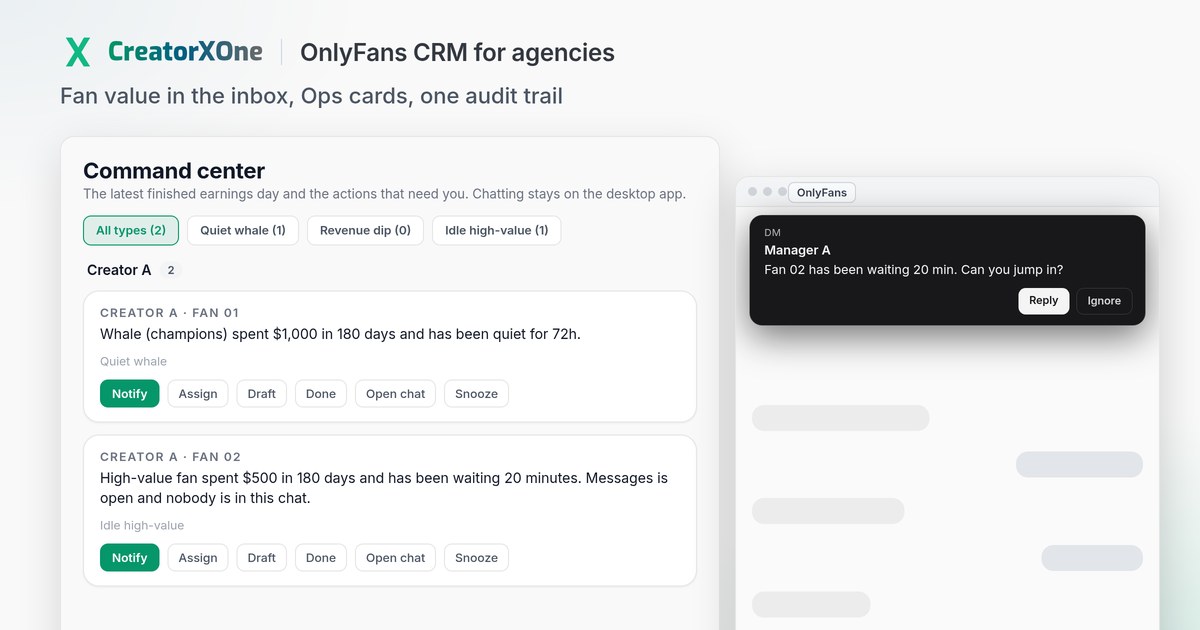
Command center shows the latest finished earnings day and a board of follow-ups that need a person. CreatorXOne checks for new cards about every 15 minutes.
| Card | When it appears |
|---|---|
| Quiet whale | The fan spent at least $500 net in the last 180 days and there has been no logged message either way for 72 hours |
| Revenue dip | A creator's net sales over the last 7 days are 70% or less of the 7 days before (earlier week at least $400) |
| Idle high-value | A fan who spent at least $200 net in 180 days is waiting on a reply and nobody has their chat open |
| Unopened paid media | Media went out 6 to 48 hours ago and the fan has not replied |
From a card a manager can assign a chatter, notify them, snooze, save a draft of up to 500 characters, or mark it done. The chatter sees a small notice inside their OnlyFans session and sends the message themselves. Nothing on the board sends a message.
Team chat and Ask a manager

Team chat is the staff messenger inside CreatorXOne: one Agency chat, direct messages and named groups, with @mentions, reactions, edit and delete. While a chatter works in an OnlyFans session, a new team message pops up as a small card they can reply to without leaving the session. Fan chats stay on OnlyFans and are never copied into Team chat.
Ask a manager works from two places. On an empty session slot it sends a team chat message to managers with a link to that creator's sessions. From the question-mark Help chat, it shows the exact message first and sends it as you only after you confirm.
Chat scripts with / search in the live composer
Type `/` in the OnlyFans composer to search your agency's chatting scripts. Scripts fill in the fan's name with `{name}`, can attach vault media and a price, and nothing sends until the chatter confirms Send.
Around the composer:
- Chat Guard checks drafts against each creator's topics and words. It warns; it does not block sending yet.
- Chat countdown timers remind every chatter on that creator when a custom or a call-back is due.
- Creator notes. Each creator's rules and persona notes on OnlyFans appear inside the live chat (with permission).
- Mass message to online fans (BETA). Start it from the live composer. Unsend unread removes copies fans have not opened yet.
Roles and permissions that reach inside OnlyFans
Permissions decide what someone can do in CreatorXOne and which OnlyFans pages they can open in a session.
- Keep chatters out of OnlyFans earnings, statements, payouts, banking and settings pages, and block file uploads.
- Stored creator logins are encrypted. Seeing or editing them is a separate permission. You can also skip storing the password and sign in on desktop, so only the session is saved and 2FA stays on OnlyFans.
- New agencies start with three roles (Agency Owner, Manager and a chatting role). Rename them or add your own. A few permissions can be scoped to Self, Team or Agency.
- Admins can require two-factor authentication for the whole agency and enforce 12-character passwords checked against known breached passwords.
Audit Center with CSV export

One Audit Center feed covers changes, access, sessions, chat, vault downloads and security. Export the loaded rows to CSV.
- Chat logs also list messages chatters unsent from the live OnlyFans chat.
- Investigation Center opens one page per employee with the creators they messaged on and their outbound messages in time order.
- Employee report lists each creator, employee and day: messages sent, unique fans, tips and session hours, with CSV export.
Payroll, shifts and sales attribution
- On OnlyFans, sales are matched to the chatter by fan assignment, last message, session or shift, and some go to manager review.
- Shift planning, hours from scheduled shifts (or from time in creator sessions in auto mode), commissions and salary calculations.
- A chatter scorecard, a Top employees board and a team performance table.
- Unlimited employee accounts.
- Tracking links for OnlyFans (and Fansly). See clicks and subscribers on your trial links. Trial links cannot be created in the app yet.
- CSV exports for monthly creator metrics, shift reconciliation, chatter pay, fan segments, chat logs and billing statements.
AI that drafts while people send
Optional AI features run inside the OnlyFans session: suggested replies in the language of the fan's latest message, chat translation, AI fan notes and a writing-style analysis so drafts match the creator's voice. The chatter clicks Use, edits if needed, and sends. There is no auto-send.
AI support chat BETA

Signed-in users click the question mark to ask how something works. AI support chat BETA answers from the CreatorXOne Help Center and links the article it used. It can also read your own account to explain your role, your creators' session status, or why numbers are empty, without changing anything. Telegram and email stay in the same panel when you want a person.
OnlyFans sessions on the desktop app
- OnlyFans always opens in Google Chrome from the CreatorXOne desktop app for Windows, macOS and Linux.
- Several employees can work on the same creator at once, each in their own session.
- If OnlyFans signs a session out, the slot shows Needs re-login and managers get a Live Sessions notice. Reconnect reopens sign-in on the same slot.
- Each creator session can run through your own proxy or the CreatorXOne HTTPS proxy.
- Live ops. Sessions shows who holds each creator account. Board shows who is chatting, waiting or idle.
OnlyFans, Fansly, ManyVids and LoyalFans in one roster

- OnlyFans and Fansly: fully supported in the same workspace: creators, live chat, vault, metrics and team tools. See Fansly CRM.
- ManyVids: supported. See ManyVids CRM.
- LoyalFans: supported from desktop app v1.3.5. Login, verify and sessions only; earnings and stats are not available yet. See LoyalFans CRM.
All four sit side by side in one roster, with a platform filter on the Creator column.
How to compare OnlyFans CRMs
Ask every vendor the same questions:
- Who sends fan messages? CreatorXOne drafts; a person sends. If you want an AI that chats on its own, CreatorXOne is not that tool.
- Can chatters work without seeing OnlyFans earnings, payouts or the creator's password? Check the permission list, not the sales deck.
- Can an owner audit what happened? Look for one feed that covers access, changes, sessions, chat and vault downloads, with export.
- How are sales credited for payroll? Ask how sales are matched to chatters and how disputes are reviewed.
- Which platforms are actually supported? Check the vendor's current platform list against your roster. CreatorXOne fully supports OnlyFans and Fansly in one workspace, and also supports ManyVids and LoyalFans.
- Can you take your data out? CreatorXOne exports metrics, fans, chat logs, payroll, shift reconciliation, billing and the Audit Center to CSV.
Where CreatorXOne is a good fit: agencies with several chatters per creator that want fan value in the inbox, an ops board for follow-ups, staff chat inside the session, and an audit trail.
Honest limits: Chat Guard warns but does not block yet. AI is suggest-only by design. CreatorXOne does not offer a public API.
Comparing several tools? Read the full buying guide: how to choose OnlyFans agency software.
Side by side: CreatorXOne vs Infloww · CreatorXOne vs OnlyMonster · Best OnlyFans CRM for chatter teams · Infloww alternative · OnlyMonster alternative · Supercreator alternative · CreatorHero alternative
Facts checked 10 October 2026.
Pricing
€1 per creator per day for OnlyFans and Fansly and €0.33 for ManyVids and LoyalFans, billed every day a creator is connected and not archived. Employees are unlimited.
Archive a creator to pause billing from the next day.
OnlyFans CRM FAQ
What is an OnlyFans CRM?
An OnlyFans CRM is software that tracks fans, chatters and sales across an agency's OnlyFans creators. CreatorXOne adds fan value to the OnlyFans inbox, an ops board for follow-ups, team chat, payroll and an audit trail in one dashboard, with Fansly, ManyVids and LoyalFans in the same roster.
Does CreatorXOne send messages to fans automatically?
No. Suggested replies, chatting scripts and Ops cards are drafts, and a person reviews and sends every message.
How does OnlyFans sales attribution work?
On OnlyFans, sales are matched to the chatter by fan assignment, last message, session or shift, and some go to manager review.
Can I stop chatters from seeing OnlyFans earnings and payouts?
Yes. Role permissions can keep chatters out of OnlyFans earnings, statements, payouts, banking and settings pages, and block file uploads.
Does CreatorXOne support Fansly, ManyVids and LoyalFans too?
Yes. OnlyFans and Fansly are fully supported in the same workspace. ManyVids is supported. LoyalFans is supported from desktop app v1.3.5 for login, verify and sessions; earnings and stats are not available yet. See Fansly CRM, ManyVids CRM and LoyalFans CRM.
Can I create tracking links and trial links?
You can create tracking links for OnlyFans and Fansly. Trial links cannot be created in the app yet. You can see clicks and subscribers on your trial links.
How much does CreatorXOne cost?
€1 per creator per day for OnlyFans and Fansly and €0.33 for ManyVids and LoyalFans, billed every day a creator is connected and not archived. Employees are unlimited. Archiving a creator pauses billing from the next day.
Is there a free trial?
Yes. 14-day trial. No payment needed to start.
Run your OnlyFans team from one dashboard
Connect a creator, open the first session on desktop, and see fans, chatters and payroll in one place.